Claude or ChatGPT for tech troubleshooting in 2026? We compare error diagnosis, code debugging, context windows, and real-world performance — so you pick the right AI.
Quick Answer
For most tech troubleshooting tasks, Claude is the stronger choice in 2026 — especially for diagnosing complex bugs, multi-file code analysis, and step-by-step reasoning. ChatGPT holds the edge when you need image-based troubleshooting (screenshots), real-time web search, or voice interaction during live debugging.
Table of Contents
- Why This Comparison Matters in 2026
- Head-to-Head: Key Specs at a Glance
- Error Diagnosis and Log Analysis
- Code Debugging and Refactoring
- Reading Documentation and Long Files
- Image-Based Troubleshooting
- Real-Time Web Search During Troubleshooting
- Accuracy and Hallucination Rates
- Troubleshooting Scenarios: Which AI Wins?
- Pricing for Troubleshooting Use Cases
- Pro Tips for Better Troubleshooting with AI
- Common Mistakes to Avoid
- Best Practices
- FAQ
- Conclusion
Why This Comparison Matters in 2026
When something breaks — an application crashes, a bash script throws an unexpected error, a Docker container won’t spin up — you need answers fast. More developers and IT professionals than ever are turning to AI assistants as their first stop before Stack Overflow.
But Claude and ChatGPT solve problems differently. They reason differently, handle context differently, and have very different strengths. Choosing the wrong one for a troubleshooting session can mean slower resolutions, hallucinated solutions, or missed root causes.
This guide is for developers, sysadmins, IT support staff, and technically curious users who want an honest, experience-based answer to one question: when your system breaks, which AI should you open first?
We tested both tools on real troubleshooting scenarios in 2026, pulling from independent benchmark data, community reports, and hands-on use cases. By the end, you’ll know exactly when to reach for Claude, when to open ChatGPT, and how to squeeze the best results from either.
Head-to-Head: Key Specs at a Glance
| Feature | Claude (2026) | ChatGPT (2026) |
|---|---|---|
| Flagship Model | Claude Opus 4.6 | GPT-5.4 |
| Context Window | Up to 200K tokens (Pro) | Up to 1M tokens (select tiers) |
| Coding Benchmark (SWE-bench) | 80.8% | 80.0% |
| Image Input | Yes (analyze screenshots) | Yes (analyze + generate) |
| Image Generation | No | Yes (DALL-E) |
| Web Search | Via tools/integrations | Native, real-time |
| Voice Mode | No native voice | Yes (Advanced Voice Mode) |
| Price (Consumer) | $20/month (Pro) | $20/month (Plus) |
| Coding Agent | Claude Code (included in Pro) | Codex (separate) |
| Best For | Deep reasoning, coding, long docs | Multimodal, ecosystem, speed |
Error Diagnosis and Log Analysis
This is where the rubber meets the road for most tech troubleshooting.
How Claude Handles Errors
Claude’s approach to error diagnosis is methodical. Paste in a stack trace or a long application log and Claude doesn’t just spot the obvious line — it reads the surrounding context, identifies the probable root cause, and walks you through a logical fix.
Its large context window is a meaningful advantage here. Claude Pro’s 200K token window means you can drop in an entire application log without truncating anything. Claude holds all of it in context simultaneously, which matters when the error on line 847 is actually caused by a condition set on line 12.
Claude also explains its reasoning clearly. You don’t just get a suggested fix — you get an explanation of why the error occurred. That makes it genuinely educational, not just a patch dispenser.
How ChatGPT Handles Errors
ChatGPT is fast and confident. It often produces a plausible-looking fix before you’ve finished reading its response. For common, well-documented errors (Python import issues, npm package conflicts, HTTP status codes), this speed is genuinely useful.
However, ChatGPT is more prone to making assumptions when the problem is ambiguous. It may produce a confident-sounding fix based on the most common cause, even when your log clearly suggests something less typical. For straightforward errors, this is fine. For nuanced production bugs, it can send you down the wrong path.
Verdict for Error Diagnosis
Claude wins for complex, multi-layered errors and full log analysis. ChatGPT wins for quick lookups on common, well-known error messages.
Code Debugging and Refactoring
Claude’s Strengths in Debugging
Independent testing shows Claude reaching around 95% functional accuracy on coding tasks, compared with approximately 85% for ChatGPT — a meaningful gap for production debugging work.
Claude’s real advantage in 2026 is its whole-codebase awareness. Claude Code (included in the Pro subscription) runs locally on your machine, reads your entire codebase, makes file edits, and runs commands. It never uploads your code to a cloud container. For debugging sprawling multi-file applications, this is a qualitatively different experience than pasting individual snippets into a chat window.
When Claude edits something in your code, it tells you exactly why. This is critical when you’re trying to understand what went wrong, not just accept a patch.
Claude is especially strong at:
- Multi-file refactors where context from one file affects another
- Architectural debugging (logic and flow problems, not just syntax)
- Long debugging sessions where earlier context matters
- Explaining errors in plain language alongside the fix
ChatGPT’s Strengths in Debugging
ChatGPT handles quick, self-contained debugging tasks very well. Drop in a 30-line function with a bug and you’ll often get a working fix in seconds. For developers who want fast iteration on small snippets, ChatGPT’s speed is hard to beat.
ChatGPT is also stronger when the fix requires looking something up — it can search the web in real time to find the latest library documentation, changelogs, or known bugs for a specific version.
ChatGPT is especially strong at:
- Fast fixes on isolated, self-contained code
- Debugging issues tied to specific library versions (using web search)
- Running code in its sandbox to verify the fix
- Tasks where image input matters (e.g., debugging a UI layout from a screenshot)
Verdict for Code Debugging
For serious development work, Claude is the preferred tool among developers in 2026. Cursor IDE, widely considered the most popular AI code editor this year, uses Claude as its default model. For quick one-off fixes, ChatGPT is perfectly capable.
Reading Documentation and Long Files
Context Window Reality
One of the most practical differences for troubleshooting is how much text each AI can actually process in one go.
Claude Pro’s 200K context window is available at the $20/month tier. This means you can feed Claude an entire technical specification, a long README, a dense configuration file, or a multi-thousand-line codebase in a single session. It processes all of it simultaneously.
For troubleshooting, this matters when the fix requires understanding interdependencies across a large document — something that gets lost when you have to break content into chunks and lose earlier context.
Verdict for Long Documents
Claude has a clear advantage for long-document troubleshooting at the consumer price point.
Image-Based Troubleshooting
When Screenshots Are Your Evidence
Many real-world troubleshooting scenarios involve visual evidence: a UI that renders incorrectly, an error dialog box, a garbled terminal output captured as a screenshot.
Both Claude and ChatGPT can analyze images in 2026. You can upload a screenshot of an error and ask either AI what it means and how to fix it. Both handle this reasonably well for common error dialogs and familiar UI states.
The difference is that ChatGPT can also generate images — useful if you need to create a diagram, annotate a screenshot, or produce visual documentation as part of your fix. Claude has no image generation capability.
For pure troubleshooting where you’re uploading screenshots and asking for interpretation, both tools perform similarly.
Verdict for Image-Based Troubleshooting
A tie for screenshot analysis. ChatGPT wins if you need to generate visual output as part of the solution.
Real-Time Web Search During Troubleshooting
The Version Problem
One of the most common tech troubleshooting failure modes is AI confidently giving you advice based on outdated information. Library APIs change. Framework versions introduce breaking changes. Error behavior shifts between releases.
ChatGPT has native, real-time web search. During a troubleshooting session, it can look up the current documentation, check if a bug has been reported on GitHub, or verify whether a fix applies to your specific version. This is a genuine advantage for anything version-sensitive.
Claude doesn’t browse the web natively in the standard interface, though web search is available via integrations and the API. For real-time lookups during a chat troubleshooting session, ChatGPT has the edge.
Verdict for Real-Time Search
ChatGPT wins clearly. If your troubleshooting involves checking current library docs, recent changelogs, or known bugs in a specific version, ChatGPT is the better tool.
Accuracy and Hallucination Rates
What the Data Says
On the industry’s most rigorous coding evaluation (SWE-bench Verified), Claude Opus 4.6 scores 80.8% and GPT-5.2 scores 80.0% — essentially a dead heat, though the tests used different scaffolding, so direct comparison has limits. On GPQA Diamond, a graduate-level reasoning and science benchmark, Claude Opus 4.6 scores 91.3%, suggesting a stronger performance on tasks requiring careful, methodical thinking.
In practice, both models occasionally produce plausible-but-wrong fixes. The key difference is how they fail. Claude is more likely to say it’s uncertain and ask for clarification. ChatGPT is more likely to provide a confident, wrong answer. For troubleshooting, knowing when an AI is unsure is arguably more valuable than speed.
Verdict for Accuracy
Slight edge to Claude for complex reasoning tasks. Both make mistakes; Claude is more likely to signal uncertainty.
Troubleshooting Scenarios: Which AI Wins? {#troubleshooting-scenarios}
| Troubleshooting Task | Best Tool | Why |
|---|---|---|
| Analyzing a 5,000-line application log | Claude | Larger context window; holds full log simultaneously |
| Debugging a Python import error | Either | Both handle common errors well |
| Finding a bug in a 20-file codebase | Claude | Claude Code reads full codebase locally |
| Checking if a library version has a known bug | ChatGPT | Native real-time web search |
| Interpreting an error screenshot | Either | Both analyze images |
| Explaining why a bug occurred, not just fixing it | Claude | Better at step-by-step reasoning explanation |
| Quick fix for an isolated function | ChatGPT | Faster for small, self-contained tasks |
| Debugging a rendering issue with visual output | ChatGPT | Can generate annotated screenshots |
| Troubleshooting a production system during a live incident | Claude | Better at holding complex context across a long session |
| Finding the latest fix for a dependency conflict | ChatGPT | Web search finds current GitHub issues and changelogs |
Pricing for Troubleshooting Use Cases
Both Claude Pro and ChatGPT Plus are priced at $20/month for consumers. What you get for that $20 differs:
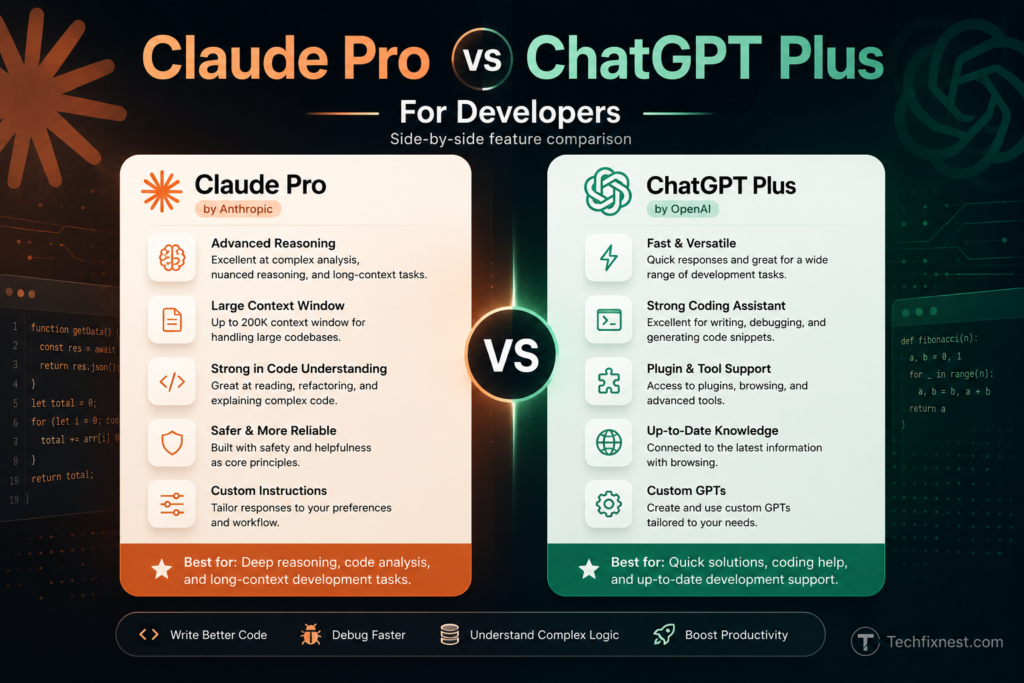
Claude Pro ($20/month) includes:
- Claude Opus 4.6 (flagship model)
- 200K token context window
- Claude Code (terminal coding agent, runs locally)
- File and document uploads
ChatGPT Plus ($20/month) includes:
- GPT-5.4 (flagship model)
- Image generation (DALL-E)
- Advanced Voice Mode
- Native real-time web search
- Code sandbox execution
- Broader plugin and GPT ecosystem
API pricing note: Claude’s flagship API is significantly more expensive than GPT-5.4 at scale. If you’re building troubleshooting tools or integrations, factor this in — GPT-5.4 is roughly 5-6x cheaper per token at the API level.
Pro Tips for Better Troubleshooting with AI
- Always include the full error message. Never paraphrase. Paste the exact error text, including stack trace lines. Truncated errors lead to guessed solutions.
- State your environment upfront. Include OS, language version, framework version, and relevant dependencies. “Python 3.11 on Ubuntu 22.04 with Django 4.2” gets better answers than “my Python app.”
- Paste the relevant code, not a description of it. AI tools cannot read your mind. The actual code, config file, or log is always better than a summary.
- Use Claude for sessions that will go long. If you expect to share a lot of context over many turns, Claude’s memory of earlier content in a session is more reliable.
- Use ChatGPT when the fix might involve version-specific docs. Tell it to search before answering, especially for libraries that release frequently.
- Ask for an explanation alongside the fix. Prompting “explain why this happened” produces understanding, not just a one-time patch.
- Verify AI-generated fixes before deploying. Both tools can and do produce plausible-looking code with subtle bugs. Always test in a development environment first.
- Use Claude Code for codebase-level debugging. If you’re spending more than 20 minutes diagnosing something, the terminal-based agent is more powerful than copy-pasting into a chat window.
- Tell the AI what you’ve already tried. This prevents it from suggesting solutions you’ve already ruled out.
- Ask follow-up questions. If the first fix doesn’t work, describe what happened — don’t start a new session. Context from earlier in the conversation helps narrow down the problem.
Common Mistakes to Avoid
Trusting the first answer without testing. AI fixes look plausible. They aren’t always correct. Always test before shipping.
Using AI for security-sensitive fixes without review. Both tools can suggest fixes that patch one surface while opening another. Treat AI-suggested security changes with extra scrutiny.
Pasting only the error, not the context. The line that throws the error is rarely the only relevant code. Include the function, the call site, and the relevant config.
Starting a new session every time. Mid-session context is valuable. Continuing an existing troubleshooting thread lets the AI build on what it already knows about your system.
Assuming the AI knows your library version. It doesn’t unless you tell it. Incorrect version assumptions cause incorrect fixes.
Treating confidence as correctness. ChatGPT in particular can sound certain about wrong answers. A confident tone does not mean a correct answer.
Not asking why. Fixing the symptom without understanding the cause means the same bug appears later, possibly in a harder-to-diagnose form.
Best Practices
Build a troubleshooting template. Before pasting anything into an AI, fill in: OS, language version, framework version, what you expected, what actually happened, exact error message, relevant code, and what you’ve already tried. This takes two minutes and dramatically improves answer quality.
Use both tools strategically. Claude for deep, context-heavy debugging. ChatGPT for quick lookups and version-specific questions. Neither tool has to be your only tool.
Save useful sessions. When an AI helps you solve a tricky problem, save the thread. Your future self will benefit from the reasoning trace, not just the fix.
Keep AI in the loop as the fix evolves. If the first fix introduces a new error, paste that error into the same session. Iterative troubleshooting in one context produces better results than isolated queries.
Review generated code with the same rigor as code review. AI-generated fixes should go through the same review process as any other code change, especially in production systems.
FAQ
For complex, multi-file debugging, Claude has a measurable edge in 2026. Independent testing shows roughly 95% functional accuracy for Claude versus 85% for ChatGPT on coding tasks. Claude also explains its reasoning more consistently, which matters when you’re trying to understand a bug, not just fix it. For quick, self-contained fixes, both tools perform well.
Yes. Both tools accept image uploads in 2026 and can analyze screenshots of error messages, terminal output, or UI bugs. If you need to also generate visual output (like an annotated diagram), ChatGPT has that capability through DALL-E; Claude does not.
Claude Pro includes a 200K token context window at the $20/month tier. This is sufficient for most application logs, large configuration files, and multi-file codebases. Some ChatGPT tiers now offer up to 1M tokens, but access varies by plan. For the standard $20 tier, Claude’s 200K is meaningfully larger.
Yes. ChatGPT has native real-time web search, which makes it significantly better for troubleshooting issues tied to specific library versions, recent framework changes, or bugs filed on GitHub. Claude does not browse the web natively in the standard chat interface.
ChatGPT, because it can fetch and search current documentation in real time. This matters when you’re working with APIs that update frequently or when you need to confirm whether a behavior changed in a recent release.
Yes. Claude Code is a terminal-based coding agent included in the Claude Pro subscription. It runs locally on your machine, reads your full codebase, edits files, and executes commands — without uploading your code to a cloud container. For debugging production applications where code confidentiality matters, this is a practical advantage.
Both tools produce incorrect answers. Claude is generally more likely to signal uncertainty and ask for clarification before producing a fix. ChatGPT tends toward confident answers even when the fix is wrong. For critical troubleshooting, Claude’s tendency to hedge is actually a feature — a wrong-but-uncertain answer is safer than a wrong-but-confident one.
ChatGPT has a slight edge for beginners due to its larger ecosystem, more documentation and tutorials online, and broader consumer feature set. However, Claude’s tendency to explain reasoning in plain language makes it a strong learning tool. Either is a solid starting point.
Both cost $20/month at the standard consumer tier. The practical difference is what you get: Claude Pro includes Claude Code, which has significant value for daily coding and debugging. ChatGPT Plus includes image generation, voice mode, and a broader plugin ecosystem. For developers who troubleshoot code daily, Claude Pro’s included Claude Code makes it the stronger value.
Claude Code integrates directly with the terminal and is included in Claude Pro. ChatGPT doesn’t have a native terminal integration in the same sense, though third-party tools and the API can be used to build one.
For infrastructure troubleshooting — reading config files, diagnosing YAML errors in Kubernetes manifests, or parsing nginx logs — Claude’s context window and careful reasoning give it an edge. For checking whether a known bug exists in a specific version of a networking tool, ChatGPT’s web search is invaluable.
Absolutely, and many experienced developers do. A common workflow: use Claude for deep, session-length debugging on complex problems, and use ChatGPT for quick web searches, image generation, or version-specific documentation lookups. The tools complement each other well.
Conclusion
For tech troubleshooting in 2026, there isn’t a single winner — but there’s a clear answer for most developers and IT professionals.
If your work involves diagnosing complex bugs, reading large logs or codebases, understanding why something broke rather than just patching it, or doing session-length deep dives into hard problems — Claude is the stronger daily tool. Its reasoning quality, context window, and the included Claude Code terminal agent make it the preferred choice among developers this year.
If your troubleshooting regularly involves checking current library documentation, diagnosing issues from screenshots you need to annotate, using voice interaction during live debugging, or working within the Microsoft ecosystem — ChatGPT has real advantages.
The good news: both cost the same at the consumer level. You don’t have to choose permanently. Start with Claude for your deep, complex troubleshooting. Keep ChatGPT in your toolkit for quick web-assisted lookups and multimodal tasks. Used together, they cover nearly every troubleshooting scenario you’ll encounter.